总览
Common UI 一旦接进项目,调试方法比“看蓝图执行线”重要得多。输入路由、激活树、焦点、ActionBar 和设备图标都跨越多个系统,排查必须按链路来。
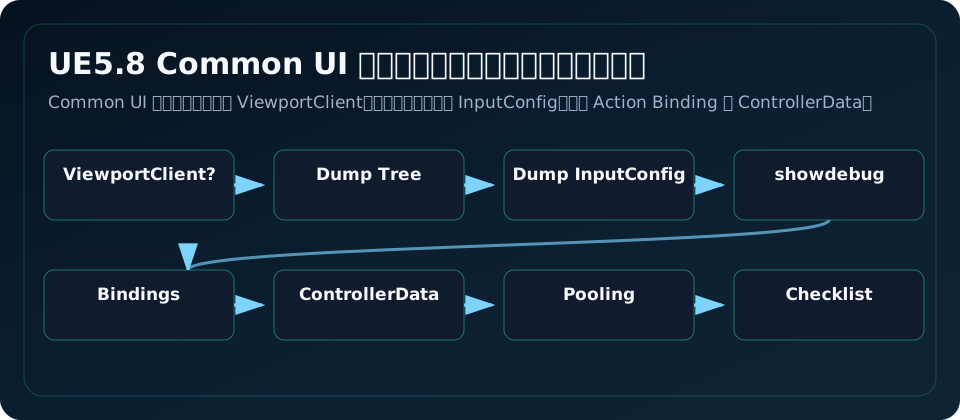
必会命令
| 命令 | 用途 |
|---|---|
CommonUI.DumpActivatableTree | 输出当前 Activatable Widget 树、actions、children、inactive |
CommonUI.DumpInputConfig | 输出每个 LocalPlayer 当前 InputConfig |
showdebug ActionRouter | 屏幕显示 Action Router、当前 InputType、InputMode、Persistent Bindings |
CommonUI.DumpActivatableTree 支持参数:bIncludeActions bIncludeChildren bIncludeInactive LocalPlayerId。比如 CommonUI.DumpActivatableTree 1 1 1 0 可以看 0 号本地玩家完整树。
关键控制台变量
| CVar | 用途 |
|---|---|
CommonUI.Debug.CheckGameViewportClientValid | 检查是否使用 CommonGameViewportClient |
CommonUI.Debug.TraceConfigChanges | 追踪 InputConfig 变化 |
CommonUI.Debug.TraceConfigOnScreen | 把 InputConfig trace 显示到屏幕 |
CommonUI.AlwaysShowCursor | 强制显示光标 |
CommonUI.AutoFlushPressedKeys | 切到 Menu 时 flush pressed keys |
CommonInput.ShowKeys | 控制是否显示输入提示 |
CommonInput.EnableGamepadPlatformCursor | 手柄平台光标相关 |
调试时先打开 trace config,再操作页面,看 InputMode 是否按预期从 Game -> Menu -> Game。
排查顺序
Back 不工作
- 是否配置
CommonGameViewportClient。 - 当前页面是否继承
CommonActivatableWidget。 - 页面是否在 Stack 中并处于激活树 leaf。
- 是否勾选
bIsBackHandler。 - InputData/EnhancedInputBackAction 是否配置。
CommonUI.DumpActivatableTree是否能看到 Back binding。
ActionBar 不显示
- Binding 是否
bDisplayInActionBar=true。 - ActionBar 的
ActionButtonClass是否正确。 - Action 是否对当前输入类型有有效 key。
- ControllerData 是否有该 key 图标。
- 当前页面是否 active,而不是只 Construct。
焦点丢失
- 页面是否
bSupportsActivationFocus=true。 BP_GetDesiredFocusTarget是否返回可见、可启用、可聚焦控件。- 页面打开后是否异步生成内容,需要调用
RequestRefreshFocus。 - 是否有 Modal 层抢焦点未关闭。
性能与池化
CommonActivatableWidgetContainer 有 Widget Pool。好处是减少频繁构造销毁,坏处是你必须把页面当“会复用”的对象:
NativeOnActivated每次刷新数据。NativeOnDeactivated清理临时状态。- 不把上一次的选中项、异步句柄、动画状态当默认值。
- 长列表用 ListView 虚拟化,不要一次创建几百个按钮。
- 图标和大图用 LazyImage/LoadGuard 异步。
多 LocalPlayer
Common UI 的 Router 和 CommonInput 都是 LocalPlayerSubsystem。分屏或本地双人时,每个玩家有自己的输入类型、Action Router、RootLayout 和激活树。不要把 RootLayout 做成全局单例;至少要按 LocalPlayer 保存。
ActionBar 里的 bDisplayOwningPlayerActionsOnly 默认 true,通常保持。否则多个玩家的绑定可能混在一起显示。
命名和目录建议
/UI/Common/WBP_CommonButton
/UI/Common/WBP_BoundActionButton
/UI/Layout/WBP_RootLayout
/UI/Screens/WBP_MainMenu
/UI/Screens/WBP_Settings
/UI/Dialogs/WBP_ConfirmDialog
/Input/UI/IA_UI_Back
/Input/UI/IA_UI_Click
/Input/UI/IMC_UI_Default
/Input/Common/BP_CommonInputData
/Input/Common/BP_ControllerData_Xbox
页面命名用 Screen/Dialog/Panel 区分职责。Action 命名用 UI 语义,不用物理键名。
常见坑
- 只看 Widget 蓝图执行线,不看 Action Router 当前激活树。
- 问题发生在本地双人时,还按全局单例思路查 RootLayout。
- 关闭页面后没跑 DumpActivatableTree,残留页面长期抢 Back。
- 为了修焦点手动 SetKeyboardFocus 到处写,反而绕过 Desired Focus。
- 把页面池化当成“页面永远是新对象”,导致旧异步状态和旧选中项泄漏。
上线检查清单
- 所有顶层页面都通过 RootLayout 的 Stack/Queue 打开。
- 所有可输入页面都有 Desired Focus。
- Back、Confirm、NextTab、PreviousTab 都在键鼠和手柄测试过。
- CommonGameViewportClient 已配置。
- ActionBar 在 Xbox/PS/键鼠/触摸至少一种设备下有图标或文本 fallback。
- 关闭页面后
CommonUI.DumpActivatableTree没有残留不该 active 的页面。 - 设置页、商店、背包异步回调在页面关闭后不会访问失效对象。
- 本地多人项目每个 LocalPlayer 有独立 RootLayout。
源码依据
CommonUIActionRouterBase.cpp 注册了 CommonUI.DumpActivatableTree、CommonUI.DumpInputConfig 和 showdebug ActionRouter,并包含 CommonUI.Debug.TraceConfigChanges、CommonUI.Debug.CheckGameViewportClientValid 等变量。CommonInputSubsystem.cpp 注册 CommonInput.ShowKeys 和输入法变化相关逻辑。容器源码提醒 Widgets Pool 会复用页面,调用者不要缓存/复用创建出来的 Widget 状态。
源码路径索引
CommonUI/Private/Input/CommonUIActionRouterBase.cppCommonInput/Private/CommonInputSubsystem.cppCommonInput/Private/CommonInputPreprocessor.cppCommonUI/Public/Widgets/CommonActivatableWidgetContainer.h