总览
第一篇先不讲复杂改键,先把输入链跑通。你需要四个 Input Action 和一个 Mapping Context:IA_Move、IA_Look、IA_Jump、IA_Interact、IMC_Default。把它想成“动作资产”和“默认键位表”。
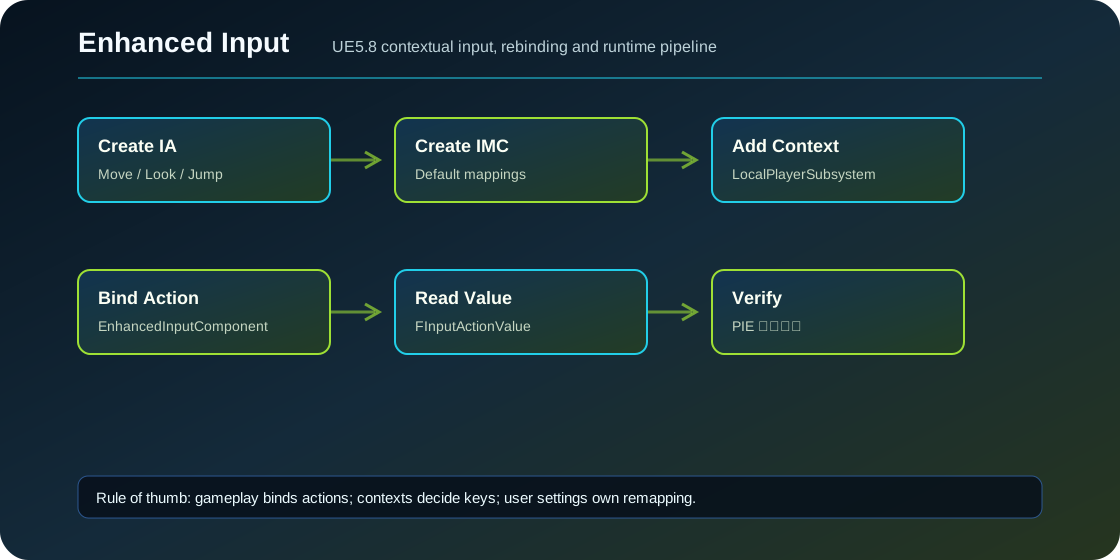
编辑器步骤
- 在 Content Browser 里创建
Input > Input Action。 IA_Move的 Value Type 设为Axis2D。IA_Look的 Value Type 设为Axis2D。IA_Jump和IA_Interact的 Value Type 设为Boolean。- 创建
Input > Input Mapping Context,命名IMC_Default。 - 在
IMC_Default里添加IA_Move,绑定W/A/S/D;W/S 映射到 Y 轴,A/D 映射到 X 轴。 - 添加
IA_Look,绑定Mouse X和Mouse Y;手柄项目还可以加Gamepad Right X/Y。 - 添加
IA_Jump绑定Space Bar,IA_Interact绑定E。
WASD 配 2D 轴时,常见规则是:W 用 Swizzle YXZ 把 1D 值放到 Y;S 在 W 的基础上再 Negate;A 用 Negate;D 直接 X。不同模板可能坐标约定略有不同,但“1D 键要被拼成 2D Action”这个思路不变。
C++ 属性
把资产暴露到角色或 PlayerController。初学建议放 PlayerController 里添加 Context,放 Character 里绑定动作;也可以都放 Character,但要确认本地玩家和输入组件都已就绪。
UPROPERTY(EditDefaultsOnly, Category = "Input")
TObjectPtr<UInputMappingContext> DefaultMappingContext;

UPROPERTY(EditDefaultsOnly, Category = "Input")
TObjectPtr<UInputAction> MoveAction;

UPROPERTY(EditDefaultsOnly, Category = "Input")
TObjectPtr<UInputAction> LookAction;

UPROPERTY(EditDefaultsOnly, Category = "Input")
TObjectPtr<UInputAction> JumpAction;

UPROPERTY(EditDefaultsOnly, Category = "Input")
TObjectPtr<UInputAction> InteractAction;
Build.cs 里要有模块依赖:
PrivateDependencyModuleNames.AddRange(new[]
{
    "EnhancedInput"
});
添加 Mapping Context
UEnhancedInputLocalPlayerSubsystem 是每个 Local Player 的输入管理器。不要把 Context 加到服务器全局,也不要加到不存在的 LocalPlayer 上。
#include "EnhancedInputSubsystems.h"

void AMyPlayerController::BeginPlay()
{
    Super::BeginPlay();

    if (ULocalPlayer* LP = GetLocalPlayer())
    {
        if (UEnhancedInputLocalPlayerSubsystem* Subsystem =
            ULocalPlayer::GetSubsystem<UEnhancedInputLocalPlayerSubsystem>(LP))
        {
            Subsystem->AddMappingContext(DefaultMappingContext, 0);
        }
    }
}
优先级 0 适合作为默认移动层。后面瞄准、载具、菜单会用更高优先级。
绑定 Action
#include "EnhancedInputComponent.h"

void AMyCharacter::SetupPlayerInputComponent(UInputComponent* PlayerInputComponent)
{
    Super::SetupPlayerInputComponent(PlayerInputComponent);

    UEnhancedInputComponent* EIC = CastChecked<UEnhancedInputComponent>(PlayerInputComponent);
    EIC->BindAction(MoveAction, ETriggerEvent::Triggered, this, &AMyCharacter::Move);
    EIC->BindAction(LookAction, ETriggerEvent::Triggered, this, &AMyCharacter::Look);
    EIC->BindAction(JumpAction, ETriggerEvent::Started, this, &ACharacter::Jump);
    EIC->BindAction(JumpAction, ETriggerEvent::Completed, this, &ACharacter::StopJumping);
    EIC->BindAction(InteractAction, ETriggerEvent::Started, this, &AMyCharacter::Interact);
}

void AMyCharacter::Move(const FInputActionValue& Value)
{
    const FVector2D Axis = Value.Get<FVector2D>();
    if (Controller == nullptr)
    {
        return;
    }

    const FRotator YawRotation(0.0, Controller->GetControlRotation().Yaw, 0.0);
    AddMovementInput(FRotationMatrix(YawRotation).GetUnitAxis(EAxis::X), Axis.Y);
    AddMovementInput(FRotationMatrix(YawRotation).GetUnitAxis(EAxis::Y), Axis.X);
}

void AMyCharacter::Look(const FInputActionValue& Value)
{
    const FVector2D Axis = Value.Get<FVector2D>();
    AddControllerYawInput(Axis.X);
    AddControllerPitchInput(Axis.Y);
}
蓝图怎么做
蓝图等价流程是:BeginPlay 里 Get Player Controller -> Get Local Player -> Get Enhanced Input Local Player Subsystem -> Add Mapping Context。角色蓝图 Event Graph 里右键 Input Action 资产,会出现 Enhanced Input Action 节点,然后从 Triggered、Started、Completed 引脚接逻辑。
验收方法
PIE 后打开 Output Log。先给 Move/Look/Interact 打印值,确认按键进来了。再按住 W 和 S,看两个方向是否能互相抵消。源码里的 EInputActionAccumulationBehavior::Cumulative 适合 WASD 这种需要叠加和抵消的动作;默认 TakeHighestAbsoluteValue 更适合多个来源里取最强输入。
常见坑
- 只创建了 IA/IMC 资产,没有调用
AddMappingContext。 - 角色不是本地控制,
GetLocalPlayer()为空。 - Project Settings 里 PlayerInputClass 被改回旧
UPlayerInput,导致 Enhanced Input 不工作。 - 在
SetupPlayerInputComponent里Cast<UEnhancedInputComponent>失败,说明 PlayerController/InputComponent 配置不对。 - Move 的 Action 类型不是 Axis2D,导致
Value.Get<FVector2D>()读错。
源码依据
UEnhancedInputLocalPlayerSubsystem 继承 ULocalPlayerSubsystem,提供 AddMappingContext 和 RemoveMappingContext。UEnhancedInputComponent 有多组 BindAction 模板,支持无参数、FInputActionValue、FInputActionInstance、动态 UFUNCTION 和 Lambda。InputAction.h 说明 Action 是 gameplay 代码绑定的逻辑表示,而不是物理按键。
源码路径索引
EnhancedInput/Public/InputAction.hEnhancedInput/Public/InputMappingContext.hEnhancedInput/Public/EnhancedInputComponent.hEnhancedInput/Public/EnhancedInputSubsystems.h