总览
Common UI 输入路由的目标是:你不需要在每个页面手动监听 Esc、Enter、手柄 B/A。当前页面激活,绑定就有效;页面停用,绑定就不该再抢输入。源码里这套机制由 UCommonUIActionRouterBase 和 FUIActionBinding 负责。
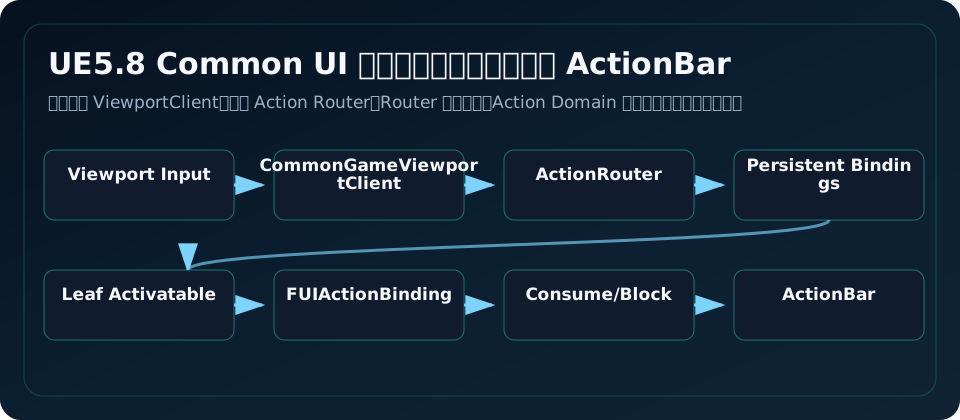
输入从哪里来
Hardware key
  -> UCommonGameViewportClient::InputKey
  -> UCommonUIActionRouterBase::ProcessInput
  -> PersistentActionCollection
  -> ActiveRoot / Leafmost Activatable Tree Node
  -> FUIActionBinding
  -> delegate or button click
如果处理结果是 Handled,输入被 UI 消费;如果是 BlockGameInput,即使 UI 没执行具体动作,也会阻止游戏输入继续处理;如果是 Unhandled,输入才继续进 gameplay。
注册一个 UI Action
最常见写法是在 Activatable Widget 里注册:
FBindUIActionArgs Args(ConfirmInputAction, true,
    FSimpleDelegate::CreateUObject(this, &UMyScreen::HandleConfirm));
Args.InputMode = ECommonInputMode::Menu;
Args.bConsumeInput = true;
Args.OverrideDisplayName = NSLOCTEXT("UI", "Confirm", "确认");

ConfirmHandle = RegisterUIActionBinding(Args);
bDisplayInActionBar=true 时,UCommonBoundActionBar 会收集当前有效绑定并创建 ActionButton。绑定必须有对当前输入设备有效的 Key,除非该输入类型在 InputTypesExemptFromValidKeyCheck 里。
DataTable、UITag、Enhanced Input 三种入口
FBindUIActionArgs 支持三种动作来源:
| 来源 | 适合 |
|---|---|
FUIActionTag | 项目统一 UI 动作表、轻量配置 |
FDataTableRowHandle | 传统 Common Input Action DataTable |
UInputAction | 开启 Enhanced Input Support 后的新项目推荐路径 |
UE5.8 源码注释保留了 DataTable 路径,并说明没有主动移除计划;但如果项目已经全面用 Enhanced Input,建议 UI Action 也逐步走 UInputAction,减少双系统维护。
ActionBar 怎么知道显示什么
UCommonBoundActionBar 监听 Router 的 OnBoundActionsUpdated 和输入设备变化。它为每个有效 binding 创建 ActionButtonClass。UCommonBoundActionButton 内部会更新 CommonActionWidget 和 Text_ActionName。
想让 ActionBar 正常显示,需要:
- ActionBar 的
ActionButtonClass指向实现了CommonBoundActionButtonInterface的按钮。 - 页面注册 binding 时
bDisplayInActionBar=true。 - 当前设备能从 action 数据或 Enhanced Input 映射解析出有效 key。
- CommonInput 的 ControllerData 能给 key 找到图标,或者至少显示文本。
长按动作
FUIActionBinding 支持 Hold:BeginHold、UpdateHold、CancelHold,并有 OnHoldActionProgressed、OnHoldActionPressed、OnHoldActionReleased。按钮也有 bRequiresHold 和 HoldData。适合“长按删除存档”“长按确认购买”。
UI 上要同时给玩家看进度:CommonActionWidget 支持 ProgressMaterialBrush 和 ProgressMaterialParam,HeldPercent 会写到材质参数。
Persistent Binding 慎用
FBindUIActionArgs::bIsPersistent 表示绑定不受激活树规则限制,总是注册并执行。源码注释说它也不会互相 stomp,多个 persistent binding 同动作会一起执行。生产项目只适合全局调试、平台级截图、无障碍快捷键这类少数场景。
常见坑
- 在普通 Button OnClicked 里处理手柄返回,导致页面不激活也能响应。
- binding 没有 Unregister,页面销毁后 ActionBar 还显示旧动作。
bDisplayInActionBar=true但当前设备没有有效 key,ActionBar 不显示。- Persistent Binding 用太多,绕过激活树后排查困难。
- UI Action 和 Gameplay Action 用同一个键,但 InputMode 还是 All,导致菜单确认同时开火。
源码依据
UCommonUIActionRouterBase 注释说它从 ViewportClient 等外部来源收集输入并转发给 activatable tree。FBindUIActionArgs 包含 InputMode、KeyEvent、persistent、consume、display in action bar、force hold 和 priority。FUIActionBinding 保存 NormalMappings、HoldMappings、ActionDisplayName、InputAction/DataTableRow,并负责 ProcessNormalInput/ProcessHoldInput。UCommonBoundActionBar 会根据当前可用绑定自动创建按钮。
源码路径索引
CommonUI/Public/Input/CommonUIActionRouterBase.hCommonUI/Public/Input/CommonUIInputTypes.hCommonUI/Public/Input/UIActionBinding.hCommonUI/Public/Input/CommonBoundActionBar.hCommonUI/Public/Input/CommonBoundActionButton.h