总览
Modifier 和 Trigger 是 Enhanced Input 最值钱的部分。Modifier 负责改输入值,比如反转 Y、死区、缩放、Swizzle;Trigger 负责判断什么时候算触发,比如按下、松开、按住、轻点、连续轻点、组合键。
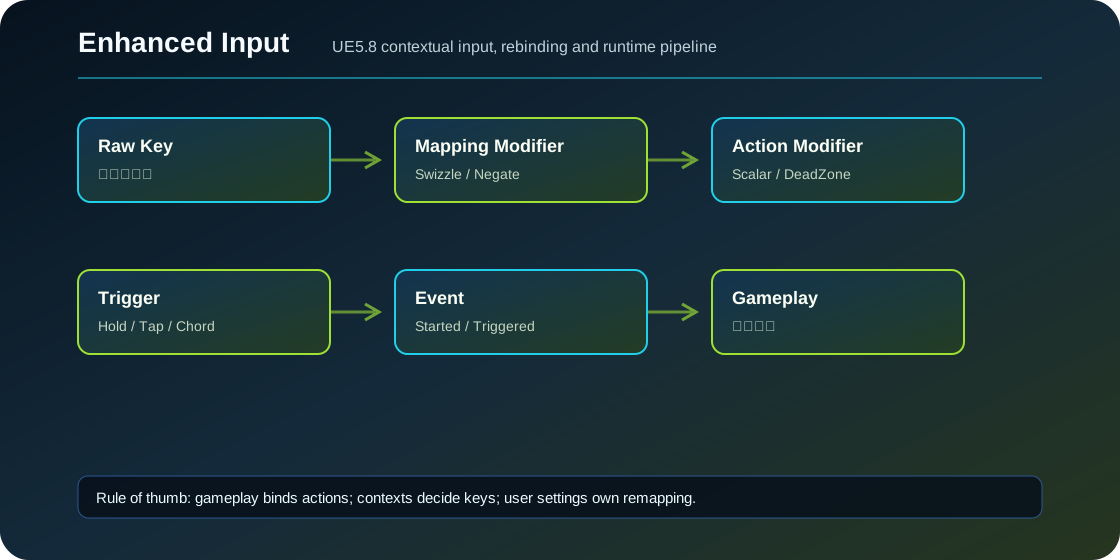
Modifier 顺序
FEnhancedActionKeyMapping 上的 Modifier 先执行,UInputAction 资产上的 Modifier 后执行。这个顺序很重要:WASD 的 Swizzle/Negate 应该放在具体按键映射上,因为 W/S/A/D 每个键的轴向不同;手柄统一灵敏度或全局反转可以放 Action 上。
Raw key value
  -> Mapping Modifiers
  -> Action Modifiers
  -> Trigger evaluation
  -> delegate event
常用 Modifier
| Modifier | 作用 | 常见场景 |
|---|---|---|
| Dead Zone | 小输入归零,模拟量去漂移 | 手柄摇杆 |
| Scalar | 按轴缩放输入 | 鼠标灵敏度、反转 |
| Negate | 反转某个轴 | S/A 键、反转 Y |
| Swizzle Axis | 轴顺序重排 | 1D 键拼成 2D |
| Smooth / Smooth Delta | 平滑输入 | 相机、光标 |
| Response Curve | 曲线响应 | 摇杆加速度 |
| FOV Scaling | FOV 相关缩放 | FPS 瞄准 |
| To World Space | 转世界方向 | 特定移动/VR 输入 |
WASD 配 Axis2D
IA_Move 设 Axis2D。D 默认给 X=1,A 加 Negate 给 X=-1;W 用 Swizzle 把 1D 放到 Y=1;S 用 Swizzle 加 Negate 变 Y=-1。这样 Move 回调只需要读一个二维向量。
常用 Trigger
| Trigger | 作用 | 常见场景 |
|---|---|---|
| Down | 超过阈值就触发 | 默认移动、开火持续 |
| Pressed | 第一次超过阈值触发一次 | 跳跃、确认 |
| Released | 从按下回到释放触发 | 松手释放技能 |
| Hold | 按住一段时间触发 | 长按交互、蓄力 |
| Hold And Release | 按够时间并释放 | 蓄力发射 |
| Tap | 短时间按下并释放 | 轻点闪避 |
| Repeated Tap | 连点 | 双击冲刺 |
| Pulse | 按住期间间隔触发 | 自动连发、扫描 |
| Chorded Action | 依赖另一个 Action | Shift+技能 |
UE5.8 源码里 UInputTriggerCombo 和相关结构被标记 deprecated。新项目不要把复杂格斗连招全押在 Combo Trigger 上,更稳的做法是用 Gameplay Ability、StateTree 或自己的输入缓冲系统处理。
使用案例:长按交互
IA_Interact 加 Hold Trigger,HoldTimeThreshold=0.6。绑定 Started 显示圆环,Ongoing 更新进度,Triggered 完成交互,Canceled 隐藏圆环。
EIC->BindAction(InteractAction, ETriggerEvent::Started, this, &AMyCharacter::BeginInteract);
EIC->BindAction(InteractAction, ETriggerEvent::Ongoing, this, &AMyCharacter::UpdateInteractHold);
EIC->BindAction(InteractAction, ETriggerEvent::Triggered, this, &AMyCharacter::CommitInteract);
EIC->BindAction(InteractAction, ETriggerEvent::Canceled, this, &AMyCharacter::CancelInteract);
使用案例:Shift+技能
做两个 Action:IA_Modifier 绑定 LeftShift,IA_HeavyAttack 绑定 LeftMouse,并在 IA_HeavyAttack 上加 Chorded Action Trigger,ChordAction 指向 IA_Modifier。源码里 Chorded Action 是 Implicit Trigger,依赖 Action 不触发时会阻挡目标 Action。
自定义 Modifier
如果项目有“按玩家设置反转 Y、按武器倍率调鼠标灵敏度”的需求,可以继承 UInputModifier:
FInputActionValue UMyLookSensitivityModifier::ModifyRaw_Implementation(
    const UEnhancedPlayerInput* PlayerInput,
    FInputActionValue CurrentValue,
    float DeltaTime)
{
    FVector Value = CurrentValue.Get<FVector>();
    Value.Y *= bInvertY ? -SensitivityY : SensitivityY;
    Value.X *= SensitivityX;
    return FInputActionValue(CurrentValue.GetValueType(), Value);
}
常见坑
- 把所有 Modifier 都放 Action 上,WASD 四个键无法分别 Swizzle/Negate。
- 手柄摇杆没 Dead Zone,角色或相机轻微漂移。
- Hold 只绑 Triggered,松开太早没有 Canceled 清 UI。
- ChordAction 指向自己或循环依赖,数据校验会报问题。
- 把复杂连招继续用 UE5.8 已 deprecated 的 Combo Trigger。
源码依据
InputModifiers.h 定义 Dead Zone、Scalar、Negate、Smooth、Response Curve、FOV Scaling、To World Space、Swizzle Axis。InputTriggers.h 定义 Down、Pressed、Released、Hold、HoldAndRelease、Tap、RepeatedTap、Pulse、ChordAction,并在 UE5.8 标记 Combo 相关类型 deprecated。EnhancedActionKeyMapping.h 注释说明 Mapping 级 Modifier 会先于 Action 级 Modifier。
源码路径索引
EnhancedInput/Public/InputModifiers.hEnhancedInput/Public/InputTriggers.hEnhancedInput/Public/EnhancedActionKeyMapping.hEnhancedInput/Public/InputAction.h