总览
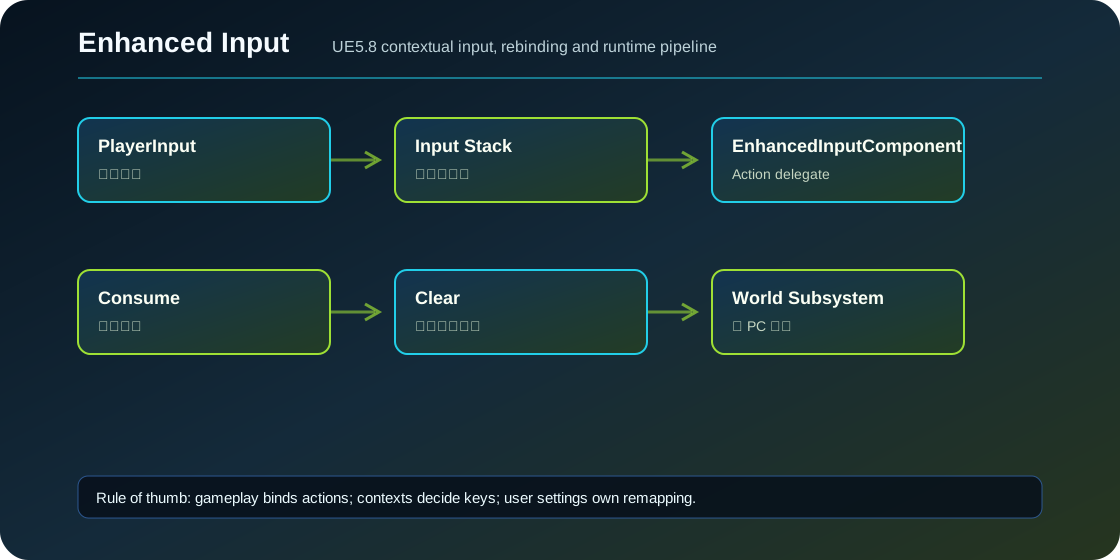
UEnhancedInputComponent 是 Action 事件真正派发到 gameplay 的地方。它不是 Mapping Context;Mapping Context 负责“哪个键触发哪个 Action”,Input Component 负责“Action 触发时调用哪个函数”。
BindAction 的几种写法
无参数函数适合跳跃这类动作:
EIC->BindAction(JumpAction, ETriggerEvent::Started, this, &ACharacter::Jump);带值函数适合移动和视角:
EIC->BindAction(MoveAction, ETriggerEvent::Triggered, this, &AMyCharacter::Move);带 Instance 函数适合蓄力、调试和需要事件信息的动作:
EIC->BindAction(ChargeAction, ETriggerEvent::Ongoing, this, &AMyCharacter::UpdateCharge);Lambda 适合短生命周期工具或测试,但生产项目别把复杂 gameplay 都塞进 Lambda:
EIC->BindActionValueLambda(DebugAction, ETriggerEvent::Triggered,
    [this](const FInputActionValue& Value)
    {
        ToggleDebugOverlay(Value.Get<bool>());
    });
BindActionValue
如果你不想每次触发都回调,只想在 Tick 或别的系统里读当前值,可以用 BindActionValue,然后 GetBoundActionValue。
EIC->BindActionValue(MoveAction);
const FVector2D Axis = EIC->GetBoundActionValue(MoveAction).Get<FVector2D>();
适合持续读取相机输入、自由飞行、编辑器工具;普通角色移动用回调更直观。
输入组件栈
UE 的 PlayerController 会维护 InputComponent Stack。源码测试 InputStackOrder 创建了三个 UEnhancedInputComponent,优先级 10、5、-1,验证高优先级先收到同一个 Action。另一个测试 InputStackConsumption 给高优先级绑定调用 SetShouldConsume(true),低优先级绑定就不会触发。
这意味着你可以让“交互中的小游戏面板”临时 Push 一个高优先级 InputComponent,结束时 Pop 掉,而不是在角色输入里写一堆 if (bInPanel)。
消费输入
UInputAction 有 bConsumeInput,绑定对象本身也可以设置 consume。需要注意,源码注释说 EnhancedInputComponent 的绑定不会像旧系统那样天然消费所有输入;更推荐用 Mapping Context 优先级表达“高层输入覆盖低层输入”。
FEnhancedInputActionEventBinding& Binding =
    EIC->BindActionValueLambda(ConfirmAction, ETriggerEvent::Triggered, OnConfirm);
Binding.SetShouldConsume(true);
清理绑定
动态创建组件或临时模式时,要在退出时清理:
EIC->ClearBindingsForObject(this);
// 或者保存 binding handle 后 RemoveBindingByHandle
UEnhancedInputComponent 还提供 ClearActionEventBindings、ClearActionValueBindings、ClearDebugKeyBindings 和 ClearActionBindings。
Actor 没有 PlayerController 怎么办
UE5.8 有 UEnhancedInputWorldSubsystem,源码注释说它用于没有 owning PlayerController 的 Actor 输入代理,例如某个门在特定按键组合下响应。它是 Experimental,并且 Actor 必须 Enable Input。普通角色、Pawn、玩家控制的交互都优先用 LocalPlayerSubsystem。
使用案例:交互面板临时接管输入
玩家打开一个撬锁面板:保留角色的 Look,但面板要接管 A/D、Space、Esc。做法是加 IMC_Lockpick 高优先级,再 Push 一个面板 InputComponent 绑定 Confirm/Cancel/Rotate。面板关闭时 Remove Context、Pop 或 Clear 绑定。不要在角色 Move 回调里判断当前是否撬锁。
常见坑
- 绑定在 Actor Component 里,但组件销毁后没清理绑定,回调指向失效对象。
- 多个组件都绑同一个 Action,忘了谁优先级高。
- 想用 InputComponent 消费解决所有冲突,但 Mapping Context 优先级没有设计。
- 在服务器专用环境执行本地输入绑定,LocalPlayer 不存在。
- 用旧
BindAxis/BindAction混在 Enhanced Input 里,源码默认删除了 legacy binding helper,除非定义ENHANCED_INPUT_ALLOW_LEGACY_BINDING。
源码依据
EnhancedInputComponent.h 暴露多组 BindAction、BindActionValue、Lambda、清理和移除 API。InputBindingTest.cpp 验证了 InputComponent 优先级顺序和绑定消费。UEnhancedInputWorldSubsystem 注释说明它服务于没有 owning PlayerController 的 Actor 输入场景,并标记 Experimental。
源码路径索引
EnhancedInput/Public/EnhancedInputComponent.hEnhancedInput/Source/InputEditor/Private/Tests/InputBindingTest.cppEnhancedInput/Public/EnhancedInputSubsystems.h