先给结论
GAS 是 UE 的玩法能力框架:它用 UAbilitySystemComponent 作为运行时中枢,用 UGameplayAbility 表达“做什么”,用 UGameplayEffect 表达“改什么状态”,用 UAttributeSet 承载数值,用 GameplayTag 描述条件和状态,用 GameplayCue 解耦表现。它最适合技能、Buff/Debuff、武器、状态机、冷却、消耗、伤害、治疗和多人预测这类系统。
UE5.8 源码里,GAS 仍位于 Engine/Plugins/Runtime/GameplayAbilities,插件默认不是 EnabledByDefault。源码的整体倾向很明确:ASC 负责权威、复制和预测;Ability 负责流程;GameplayEffect 负责可撤销、可预测、可复制的状态变化;GameplayEffectComponent 是 5.x 后续版本里组织 GE 行为的主路径。
一句话判断是否该用 GAS:如果你的玩法行为需要“属性 + 标签 + 冷却 + 消耗 + Buff + 多人同步 + 可扩展数据资产”,GAS 值得接入;如果只是单机小游戏里两个按钮扣血,手写组件可能更轻。
专题分篇目录
这篇作为总览入口。真正深入的内容拆成 10 篇,每篇只讲一个 GAS 部件,避免在一篇文章里泛泛而谈。
本文依据的 5.8 源码位置
下面这些文件是理解 GAS 的第一现场。文章中的结论都来自这些源码注释、类型定义和执行路径。
Engine/Plugins/Runtime/GameplayAbilities/GameplayAbilities.uplugin
Source/GameplayAbilities/Public/AbilitySystemComponent.h
Private/AbilitySystemComponent_Abilities.cpp
Private/AbilitySystemComponent.cpp
Public/Abilities/GameplayAbility.h
Public/Abilities/GameplayAbilityTypes.h
Public/AttributeSet.h
Public/GameplayPrediction.h
另外,UE5.8 还带了实验性的 GASToolsets:Engine/Plugins/Experimental/Toolsets/GASToolsets。它不是 GAS 运行时本体,而是 AI Toolset,可以查看 Attribute、Active Effect、Granted Ability、Active Tag,并管理 Gameplay Cue。它适合编辑器辅助和排查,不应被当成运行时依赖。
核心概念一览
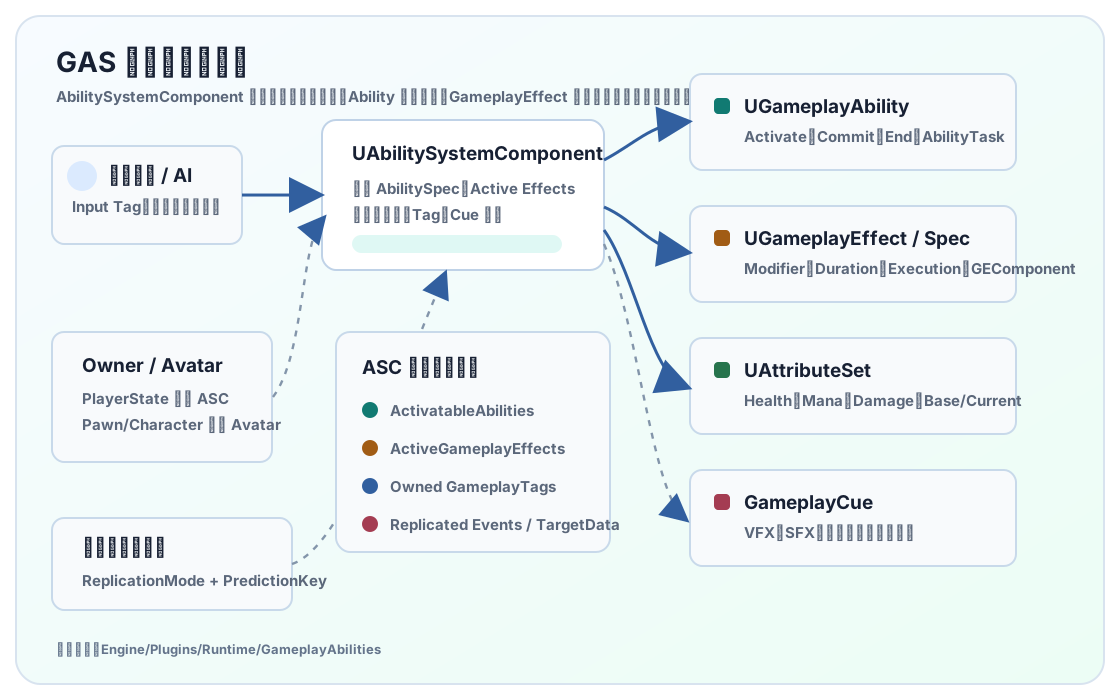
| 概念 | 主要类 | 项目里负责什么 | 常见例子 |
|---|---|---|---|
| Ability System Component | UAbilitySystemComponent |
能力授予、激活、GE 应用、标签聚合、复制、预测、Cue 调度。 | 角色身上的技能系统组件。 |
| Gameplay Ability | UGameplayAbility |
一次行为流程:检查、激活、等待输入/目标、提交消耗、结束。 | 冲刺、开火、跳劈、治疗术、交互。 |
| Gameplay Effect | UGameplayEffect、FGameplayEffectSpec |
修改属性、添加标签、授予能力、触发 Cue、管理持续时间和堆叠。 | 伤害、回血、护盾、减速、冷却、眩晕。 |
| Attribute Set | UAttributeSet、FGameplayAttributeData |
定义可被 GE 修改和复制的玩法数值。 | Health、Mana、MoveSpeed、AttackPower。 |
| Gameplay Cue | UGameplayCueNotify_Static、UGameplayCueNotify_Actor |
把状态变化转成表现,不把 VFX/SFX 写死在逻辑里。 | 命中特效、燃烧循环、护盾破裂音效。 |
类图:资产、运行时状态和复制边界
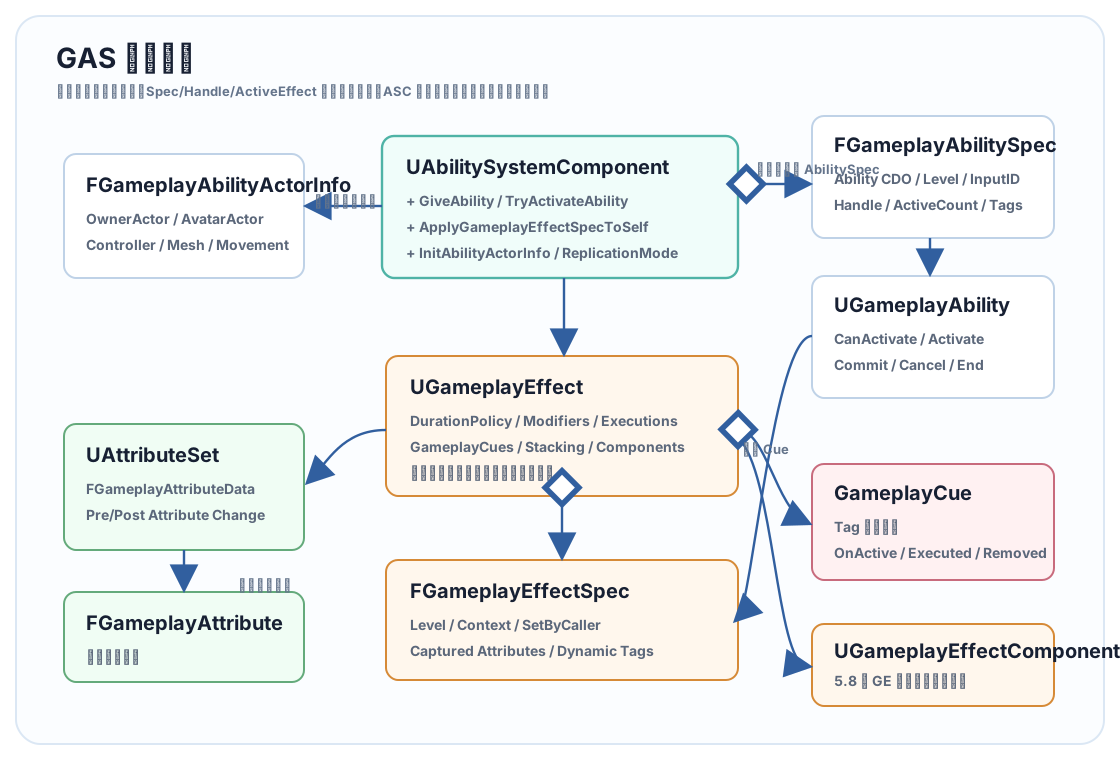
UGameplayEffect 是模板,FGameplayEffectSpec 才是本次施放携带的 Level、Context、SetByCaller 和捕获数据。FGameplayAbilitySpec 是“某个 ASC 被授予了某个 Ability”的运行时记录,里面包含 Ability CDO、等级、输入 ID、SourceObject、Handle、激活次数、动态标签和实例。UGameplayAbility 本身是能力类,是否实例化由 Instancing Policy 决定。
5.8 源码仍保留三种 Ability Instancing Policy,但 NonInstanced 在 UE5.5 起已经标记 deprecated。工程上优先用 InstancedPerActor,它最稳,能保存 Ability 内状态;短生命周期且每次激活完全独立的技能再考虑 InstancedPerExecution。
第一步:启用插件和模块依赖
编辑器里打开 Edit > Plugins,启用 Gameplay Abilities。C++ 项目还要在模块里加入依赖:
PublicDependencyModuleNames.AddRange(new string[]
{
    "Core",
    "CoreUObject",
    "Engine",
    "GameplayAbilities",
    "GameplayTags",
    "GameplayTasks"
});
如果项目使用 GameplayCue、GameplayTag 表、DataRegistry 或编辑器扩展,还会间接碰到 GameplayTags、GameplayTasks、DataRegistry 等模块。UE5.8 的 GameplayAbilities.Build.cs 里也能看到它对 NetCore、MovieScene、PhysicsCore、DeveloperSettings、DataRegistry、Niagara、Iris 支持等系统有连接点。
- 先在
Project Settings > Gameplay Tags建好 Tag 来源。 - 约定输入 Tag、状态 Tag、Cue Tag、SetByCaller Tag 的命名空间。
- 在角色或 PlayerState 上创建 ASC。
- 创建 AttributeSet、GameplayEffect、GameplayAbility 蓝图或 C++ 类。
- 服务器授予 Ability,客户端通过输入触发。
ASC 放哪里:PlayerState 还是 Pawn
UE 源码 README 对这个问题的建议很实用:玩家控制角色的 ASC 通常放在 PlayerState,因为 Pawn 会死亡、重生、切换或被替换;AI 或非玩家 Actor 可以直接放在 Pawn/Character 上。ASC 有两个核心 Actor 概念:
OwnerActor:逻辑所有者,常见是PlayerState。AvatarActor:当前承载表现和碰撞的 Actor,常见是Character。
// PlayerState 持有 ASC,适合玩家角色。
AYourPlayerState::AYourPlayerState()
{
    AbilitySystem = CreateDefaultSubobject<UAbilitySystemComponent>(TEXT("AbilitySystem"));
    AbilitySystem->SetIsReplicated(true);
    AbilitySystem->SetReplicationMode(EGameplayEffectReplicationMode::Mixed);

    CombatAttributes = CreateDefaultSubobject<UCombatAttributeSet>(TEXT("CombatAttributes"));
}

UAbilitySystemComponent* AYourPlayerState::GetAbilitySystemComponent() const
{
    return AbilitySystem;
}
// Character 成为 Avatar。服务器 PossessedBy 和客户端 OnRep_PlayerState 都要初始化。
void AYourCharacter::PossessedBy(AController* NewController)
{
Super::PossessedBy(NewController);
AYourPlayerState* PS = GetPlayerState<AYourPlayerState>();
if (PS && PS->GetAbilitySystemComponent())
{
AbilitySystem = PS->GetAbilitySystemComponent();
AbilitySystem->InitAbilityActorInfo(PS, this);
GrantStartupAbilities();
}
}
void AYourCharacter::OnRep_PlayerState()
{
Super::OnRep_PlayerState();
AYourPlayerState* PS = GetPlayerState<AYourPlayerState>();
if (PS && PS->GetAbilitySystemComponent())
{
AbilitySystem = PS->GetAbilitySystemComponent();
AbilitySystem->InitAbilityActorInfo(PS, this);
}
}复制模式怎么选:Full 给所有人完整复制 Active Gameplay Effects;Mixed 给拥有者完整复制、给其他人复制必要标签和 Cue;Minimal 常用于 AI 或大量非玩家单位。玩家角色最常见选择是 Mixed。
AttributeSet:属性不是普通 float
源码里 FGameplayAttributeData 同时保存 BaseValue 和 CurrentValue。Instant GE 通常修改 BaseValue;持续 GE 通过 Aggregator 影响 CurrentValue,移除后自动撤销。直接改 float 会绕开预测、复制和聚合,所以项目里尽量让 GameplayEffect 改属性。
#define ATTRIBUTE_ACCESSORS(ClassName, PropertyName) \
    GAMEPLAYATTRIBUTE_PROPERTY_GETTER(ClassName, PropertyName) \
    GAMEPLAYATTRIBUTE_VALUE_GETTER(PropertyName) \
    GAMEPLAYATTRIBUTE_VALUE_SETTER(PropertyName) \
    GAMEPLAYATTRIBUTE_VALUE_INITTER(PropertyName)

UCLASS()
class UCombatAttributeSet : public UAttributeSet
{
    GENERATED_BODY()

public:
    UPROPERTY(BlueprintReadOnly, ReplicatedUsing = OnRep_Health)
    FGameplayAttributeData Health;
    ATTRIBUTE_ACCESSORS(UCombatAttributeSet, Health);

    UPROPERTY(BlueprintReadOnly, ReplicatedUsing = OnRep_MaxHealth)
    FGameplayAttributeData MaxHealth;
    ATTRIBUTE_ACCESSORS(UCombatAttributeSet, MaxHealth);

    // Meta Attribute:Execution 写入 Damage,PostGameplayEffectExecute 再扣 Health。
    UPROPERTY(BlueprintReadOnly)
    FGameplayAttributeData Damage;
    ATTRIBUTE_ACCESSORS(UCombatAttributeSet, Damage);

    virtual void PreAttributeChange(const FGameplayAttribute& Attribute, float& NewValue) override;
    virtual void PostGameplayEffectExecute(const FGameplayEffectModCallbackData& Data) override;

protected:
    UFUNCTION()
    void OnRep_Health(const FGameplayAttributeData& OldHealth);

    UFUNCTION()
    void OnRep_MaxHealth(const FGameplayAttributeData& OldMaxHealth);
};
void UCombatAttributeSet::GetLifetimeReplicatedProps(TArray<FLifetimeProperty>& OutLifetimeProps) const
{
Super::GetLifetimeReplicatedProps(OutLifetimeProps);
DOREPLIFETIME_CONDITION_NOTIFY(UCombatAttributeSet, Health, COND_None, REPNOTIFY_Always);
DOREPLIFETIME_CONDITION_NOTIFY(UCombatAttributeSet, MaxHealth, COND_None, REPNOTIFY_Always);
}
void UCombatAttributeSet::OnRep_Health(const FGameplayAttributeData& OldHealth)
{
GAMEPLAYATTRIBUTE_REPNOTIFY(UCombatAttributeSet, Health, OldHealth);
}
void UCombatAttributeSet::PreAttributeChange(const FGameplayAttribute& Attribute, float& NewValue)
{
Super::PreAttributeChange(Attribute, NewValue);
if (Attribute == GetHealthAttribute())
{
NewValue = FMath::Clamp(NewValue, 0.0f, GetMaxHealth());
}
}
void UCombatAttributeSet::PostGameplayEffectExecute(const FGameplayEffectModCallbackData& Data)
{
Super::PostGameplayEffectExecute(Data);
if (Data.EvaluatedData.Attribute == GetDamageAttribute())
{
const float LocalDamage = GetDamage();
SetDamage(0.0f);
if (LocalDamage > 0.0f)
{
SetHealth(FMath::Clamp(GetHealth() - LocalDamage, 0.0f, GetMaxHealth()));
}
}
}预测属性复制时,源码注释明确提醒要用 REPNOTIFY_Always 和 GAMEPLAYATTRIBUTE_REPNOTIFY。否则客户端预测值和服务器权威值对账时容易出现 UI 不刷新、属性闪回或聚合结果残留。
Ability 生命周期
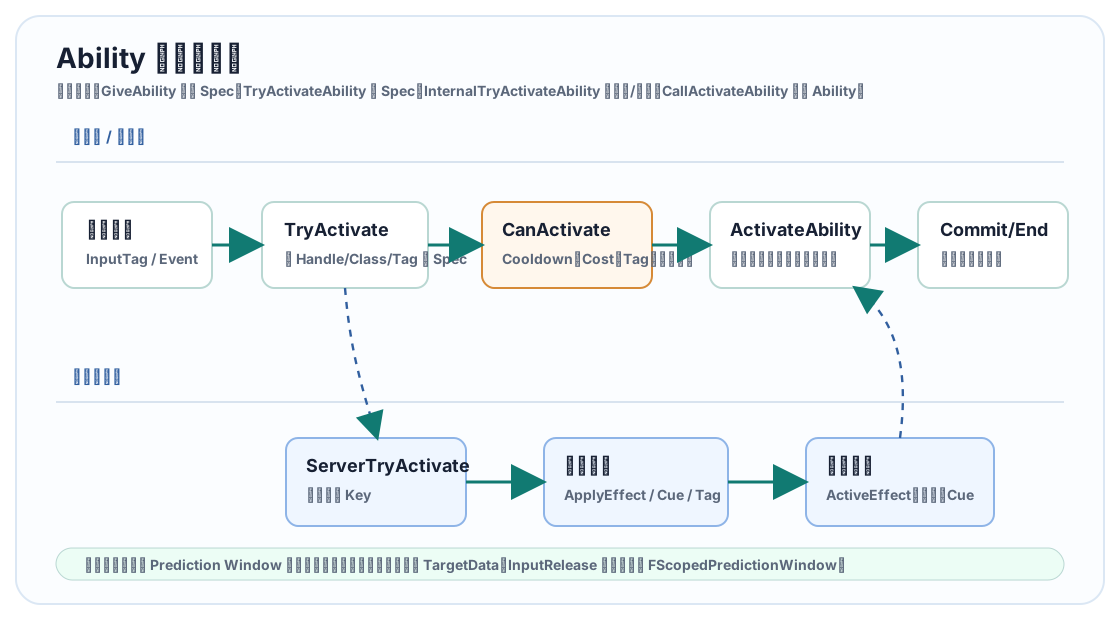
UGameplayAbility.h 的注释把主流程列得很直白:CanActivateAbility、TryActivateAbility、CallActivateAbility、ActivateAbility、CommitAbility、CancelAbility、EndAbility。项目代码通常只重写 ActivateAbility,必要时重写 CanActivateAbility、ApplyCooldown、ApplyCost。
void AYourCharacter::GrantStartupAbilities()
{
    if (!HasAuthority() || !AbilitySystem)
    {
        return;
    }

    for (const TSubclassOf<UGameplayAbility> AbilityClass : StartupAbilities)
    {
        if (!AbilityClass)
        {
            continue;
        }

        FGameplayAbilitySpec Spec(AbilityClass, 1);
        AbilitySystem->GiveAbility(Spec);
    }
}
void UGA_Fireball::ActivateAbility(
const FGameplayAbilitySpecHandle Handle,
const FGameplayAbilityActorInfo* ActorInfo,
const FGameplayAbilityActivationInfo ActivationInfo,
const FGameplayEventData* TriggerEventData)
{
if (!CommitAbility(Handle, ActorInfo, ActivationInfo))
{
EndAbility(Handle, ActorInfo, ActivationInfo, true, true);
return;
}
FGameplayEffectSpecHandle DamageSpec = MakeOutgoingGameplayEffectSpec(DamageEffectClass, GetAbilityLevel());
if (DamageSpec.IsValid())
{
static const FGameplayTag DamageTag = FGameplayTag::RequestGameplayTag(TEXT("Data.Damage"));
DamageSpec.Data->SetSetByCallerMagnitude(DamageTag, DamageAmount);
// TargetData 通常来自 AbilityTask_WaitTargetData、自定义瞄准任务或 GameplayEvent。
ApplyGameplayEffectSpecToTarget(Handle, ActorInfo, ActivationInfo, DamageSpec, CachedTargetData);
}
EndAbility(Handle, ActorInfo, ActivationInfo, false, false);
}不要把所有技能都写成一个巨大的 Ability。更稳的拆法是:Ability 负责流程,GameplayEffect 负责数值,AbilityTask 负责等待和异步,Cue 负责表现,Tag 负责状态判断。
GameplayEffect:数值变化的标准通道
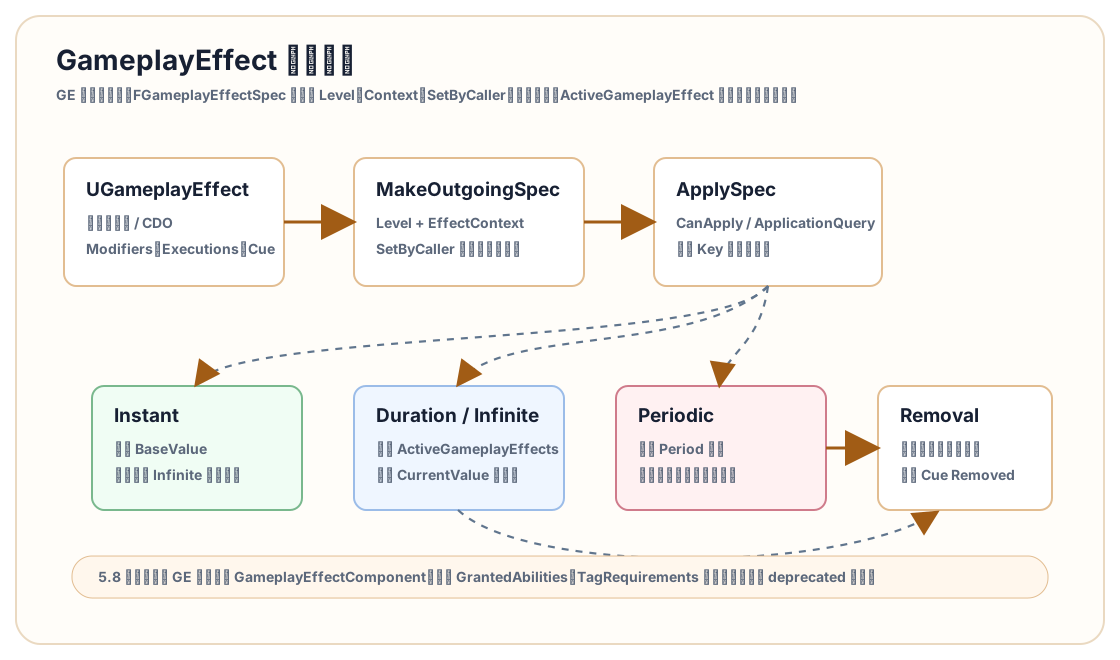
UGameplayEffect 不是“效果脚本”,它更像数据资产模板。运行时真正携带上下文的是 FGameplayEffectSpec:它有 Level、EffectContext、SetByCaller、动态标签、捕获属性、Source/Target Tag 等信息。ASC 应用 GE 时会检查权限、预测 Key、Application Query、Modifier 属性有效性、持续时间、周期效果和 Cue。
| 类型 | 源码语义 | 适合用途 |
|---|---|---|
| Instant | 立即执行,通常修改 BaseValue;预测时会临时当成 Infinite delta 等待服务器对账。 | 伤害、治疗、一次性资源消耗。 |
| Duration | 进入 ActiveGameplayEffects,持续期间影响 CurrentValue 和标签,移除后撤销。 | 加速 5 秒、护盾 10 秒、沉默 3 秒。 |
| Infinite | 一直保持,直到被显式移除。 | 装备被动、光环、长期状态。 |
| Periodic | 按 Period 周期执行;源码明确不预测周期 GE。 | 燃烧每秒扣血、持续回血。 |
Modifier 的聚合也要注意。源码里的运算模型不是“每个乘法依次连乘”,而是先聚合加法、乘法、除法等通道,再算最终值。设计数值表时不要默认 +10% 和 +30% 会变成 43%,它通常会被当成 40% 的同通道加成。
UE5.8 里的 GameplayEffectComponent
5.8 源码继续保留 UGameplayEffectComponent。这套组件从 5.3 以后成为 GE 行为组合的主要方向:旧的 GrantedAbilities、Tag Requirements、Immunity 等单体字段逐步被组件化路径替代。组件生活在 GE CDO/数据资产上,不应该保存每次执行的可变状态。
源码里的常见 GE Component 包括:
UAbilitiesGameplayEffectComponent:通过 GE 授予能力。UAdditionalEffectsGameplayEffectComponent:应用附加 GE。UAssetTagsGameplayEffectComponent:资产标签。UBlockAbilityTagsGameplayEffectComponent:阻止带某些 Tag 的 Ability。UCancelAbilityTagsGameplayEffectComponent:应用后取消某类 Ability。UChanceToApplyGameplayEffectComponent:概率应用。UImmunityGameplayEffectComponent:免疫规则。UTargetTagsGameplayEffectComponent和UTargetTagRequirementsGameplayEffectComponent:目标标签变化与需求。
建议新项目尽量按组件化方式组织 GE 行为。它比在一个 GE 资产里堆满历史字段更容易审查,也更符合 5.8 源码的演进方向。
伤害计算:用 Execution 写复杂公式
简单加减用 Modifier 足够;涉及护甲、暴击、元素抗性、等级差、命中部位时,用 UGameplayEffectExecutionCalculation 更干净。一个常见做法是 Execution 输出到 Damage 这种 Meta Attribute,再在 AttributeSet 的 PostGameplayEffectExecute 里扣 Health。下面是骨架示例,DamageStatics() 里的属性捕获定义按你的项目属性补齐。
void UExecCalc_Damage::Execute_Implementation(
    const FGameplayEffectCustomExecutionParameters& ExecutionParams,
    FGameplayEffectCustomExecutionOutput& OutExecutionOutput) const
{
    const FGameplayEffectSpec& Spec = ExecutionParams.GetOwningSpec();
    static const FGameplayTag DamageTag = FGameplayTag::RequestGameplayTag(TEXT("Data.Damage"));

    float RawDamage = Spec.GetSetByCallerMagnitude(DamageTag, false, 0.0f);

    FAggregatorEvaluateParameters EvaluateParameters;
    EvaluateParameters.SourceTags = Spec.CapturedSourceTags.GetAggregatedTags();
    EvaluateParameters.TargetTags = Spec.CapturedTargetTags.GetAggregatedTags();

    float Armor = 0.0f;
    ExecutionParams.AttemptCalculateCapturedAttributeMagnitude(
        DamageStatics().ArmorDef,
        EvaluateParameters,
        Armor);

    const float FinalDamage = FMath::Max(0.0f, RawDamage - Armor);
    OutExecutionOutput.AddOutputModifier(
        FGameplayModifierEvaluatedData(
            UCombatAttributeSet::GetDamageAttribute(),
            EGameplayModOp::Additive,
            FinalDamage));
}
这里的 SetByCaller 很适合承载施放时才知道的数值,例如蓄力时间、武器随机伤害、命中部位倍率。需要注意:Execution 的结果通常按服务器权威走,不要指望复杂伤害在客户端完整预测。
预测与网络:GAS 真正值钱的地方
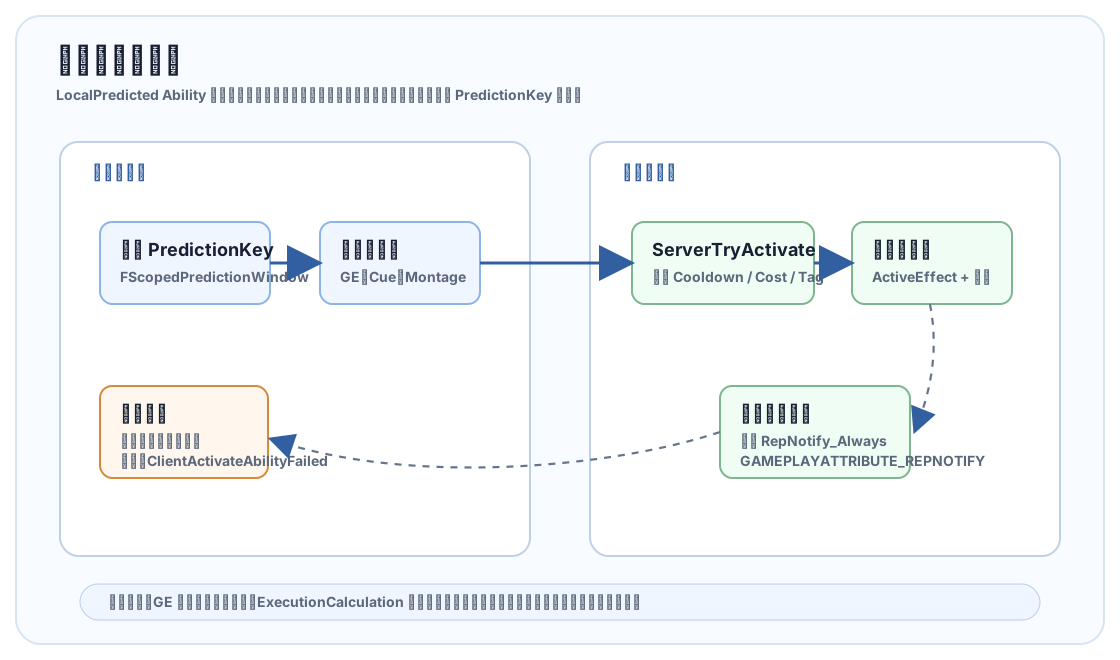
GameplayPrediction.h 的注释很直:GAS 预测初始激活、触发事件、属性/标签变化、GameplayCue、Montage 和移动的一部分;不预测 GameplayEffect 移除,也不预测周期效果。预测窗口通常只覆盖初始 ActivateAbility 调用栈,离开调用栈后的等待输入、等待目标、计时器回调,需要重新打开 FScopedPredictionWindow。
| Net Execution Policy | 语义 | 适合场景 |
|---|---|---|
LocalPredicted |
拥有客户端先执行,再由服务器确认或拒绝。 | 射击、翻滚、近战起手、需要手感的技能。 |
LocalOnly |
只在本地执行,不走服务器。 | 纯 UI、纯本地表现、训练模式辅助。 |
ServerInitiated |
服务器发起,也可以在客户端表现。 | 怪物技能、服务器驱动剧情效果。 |
ServerOnly |
只在服务器执行。 | 权威判定、管理型能力、反作弊敏感逻辑。 |
工程建议:客户端预测可以让手感变好,但不要为了“看起来很即时”把服务器权威放弃掉。命中、伤害、掉落、资源结算、排行榜这类结果应由服务器决定;客户端可以预测动画、音效、临时属性变化,再让服务器复制结果对账。
GameplayCue:表现和逻辑解耦
GameplayCue 用 Tag 驱动表现。逻辑侧只说“触发 GameplayCue.Weapon.Fire.Hit”,表现侧决定播哪个 Niagara、音效、镜头晃动或材质闪烁。源码 README 里也提醒,Cue 扫描路径会影响启动和查找,项目里要统一 Cue 目录和命名。
UCLASS()
class UGCN_HitSpark : public UGameplayCueNotify_Static
{
    GENERATED_BODY()

public:
    virtual bool OnExecute_Implementation(AActor* MyTarget, const FGameplayCueParameters& Parameters) const override
    {
        if (!MyTarget || !HitNiagaraSystem)
        {
            return false;
        }

        const FVector Location = Parameters.Location.IsNearlyZero()
            ? MyTarget->GetActorLocation()
            : Parameters.Location;

        UNiagaraFunctionLibrary::SpawnSystemAtLocation(
            MyTarget,
            HitNiagaraSystem,
            Location,
            Parameters.Normal.Rotation());

        return true;
    }

private:
    UPROPERTY(EditDefaultsOnly)
    TObjectPtr<UNiagaraSystem> HitNiagaraSystem;
};
Cue 事件名在源码里对应 EGameplayCueEvent:OnActive、WhileActive、Executed、Removed。Burst 类表现适合 Executed,持续燃烧、冰冻、护盾这种适合 OnActive/WhileActive/Removed。
AbilityTask 和 TargetData
AbilityTask 是 Ability 里的异步节点:等待输入释放、等待 Montage 结束、等待目标选择、等待 GameplayEvent。TargetData 则是“本次技能命中了什么”的复制容器。源码里 ASC 有 ServerSetReplicatedTargetData、ConfirmAbilityTargetData、CancelAbilityTargetData 等路径,说明目标数据是 GAS 网络模型的一等公民。
实践上,别让 Ability 直接去世界里乱找目标。更稳的做法是:
- 输入触发 Ability。
- AbilityTask 或自定义 Trace 生成 TargetData。
- 客户端预测时先提交 TargetData。
- 服务器校验距离、视线、阵营和命中合法性。
- 服务器应用 GE,复制属性、Cue 和状态。
UE5.8 的 GASToolsets:AI 辅助排查
UE5.8 源码里的 GASToolsets 是 Experimental、EditorOnly、默认关闭。它分成三组工具:
UAttributeSetToolset:查找 AttributeSet 类、列出属性。UAbilitySystemInspectorToolset:查看选中 Actor 的 Attribute Values、Active Effects、Granted Abilities、Active Tags。UGameplayCueToolset:列出 Cue、获取 Cue 信息、查找 Cue Notify、创建 Cue Notify、添加/移除 Cue Tag、找出没有 Notify 的 Cue Tag。
这些工具很适合回答“这个角色现在为什么不能放技能”“某个 Buff 到底还在不在”“Cue Tag 有没有对应 Notify”。但源码里对会修改项目的 Cue 操作有明确警告:只有在用户明确允许时才调用。换到团队流程里,就是 AI 可以帮忙检查,但创建资产、改 Tag、删 Cue 必须有人工确认。
一个推荐的项目接入流程
- 先设计 GameplayTag 命名:
Ability.*、Status.*、Cooldown.*、GameplayCue.*、Data.*。 - 创建 ASC Owner:玩家用 PlayerState,AI 用 Pawn 或专用 Actor。
- 创建最小 AttributeSet:Health、MaxHealth、Mana、MaxMana、MoveSpeed,再加 Damage 这种 Meta Attribute。
- 创建初始化 GE:设置初始 MaxHealth、Health、Mana,不要在 BeginPlay 里手改属性。
- 创建冷却 GE 和消耗 GE,Ability 里用
CommitAbility统一提交。 - 创建第一批 Ability:普通攻击、冲刺、治疗、受击反应。
- 创建 Cue:命中、治疗、燃烧、护盾等表现全部 Cue 化。
- 接入输入:Enhanced Input 映射到 Input Tag,再由 ASC 激活对应 Ability。
- 做多人测试:Listen Server、Dedicated Server、延迟模拟都要跑。
- 最后才抽象项目自己的 Ability 基类、Effect Context、TargetData 和调试面板。
别急着上大框架。GAS 已经足够抽象,项目早期先让一套最小攻击/受击/冷却跑通,比一开始封装十层“万能技能系统”更靠谱。
调试方法
UE5.8 的 GAS README 里强调 Gameplay Debugger 已经是首选调试方式,旧的 ShowDebug AbilitySystem 更偏遗留路径。调试时优先看这几类信息:
- ASC 是否初始化了正确的 OwnerActor 和 AvatarActor。
- Ability 是否已经
GiveAbility,Spec Handle 是否有效。 - 失败时是 Cost、Cooldown、Tag Requirement、Net Execution Policy 还是 Authority 检查没过。
- ActiveGameplayEffects 是否存在,Stack、Duration、Granted Tags 是否正确。
- Attribute 是否用
REPNOTIFY_Always和GAMEPLAYATTRIBUTE_REPNOTIFY对账。
AbilitySystem.Ability.Grant
AbilitySystem.Ability.Activate
AbilitySystem.Ability.Cancel
AbilitySystem.Ability.ListGranted
AbilitySystem.Effect.ListActive
AbilitySystem.Effect.Apply
AbilitySystem.Effect.Remove
Visual Logger 也值得接。多人问题经常不是“没有执行”,而是执行在错误机器、错误 ActorInfo、错误预测窗口里。把 Ability 激活、GE 应用、Tag 变化和 TargetData 校验打进日志,排查速度会快很多。
常见坑和建议
- 忘记 InitAbilityActorInfo:Ability 拿不到 Avatar、Controller、Mesh,后续表现和权限判断都会怪。
- 客户端调用 GiveAbility:
GiveAbility需要 Authority,授予能力放服务器。 - 把属性当普通变量改:绕开 GE 会丢掉预测、撤销、Tag、Cue 和复制语义。
- 把所有表现写在 Ability:以后换特效、音效、材质反馈会很痛,应该用 GameplayCue。
- 滥用 NonInstanced:UE5.5 起已 deprecated,新项目不要依赖。
- Ability 内复制变量:源码 README 已提醒这条路径 deprecated,跨网络数据优先用 RPC、TargetData、Replicated Event 或 ASC 状态。
- 周期效果想当然预测:源码明确不预测 Periodic GE,按服务器结果设计 UI 和表现。
- PlayerState ASC 的 relevancy:PlayerState 持有 ASC 时,GameplayCue 代理和网络相关性要额外留意,必要时实现复制代理接口。
生产级检查清单
| 检查项 | 建议 |
|---|---|
| Tag 规范 | Ability、Cooldown、Status、GameplayCue、Data 分命名空间,禁止临时散 Tag。 |
| 属性复制 | 属性用 RepNotify Always,对 UI 层提供属性变化委托,不让 UI 每帧读 ASC。 |
| 技能数据 | Ability 里放流程,数值进 GE/DataAsset/CurveTable,避免硬编码。 |
| 多人验证 | 每个可预测 Ability 都测高延迟、丢包、服务器拒绝、目标失效。 |
| 调试入口 | 至少提供查看 Granted Abilities、Active Effects、Owned Tags、核心属性的调试面板。 |
| AI Toolset | 可以用 5.8 GASToolsets 辅助检查,但修改 Cue/Tag/资产要走人工确认和版本控制。 |
GAS 的学习曲线确实陡,但它解决的是大型玩法系统里最难维护的那部分:状态来源、网络权威、预测回滚、Buff 叠加、表现解耦和调试可视化。把边界定清楚后,它会比手写一套“先能跑”的技能系统更耐用。