总览
GAS 项目写到中期,最先混乱的往往不是伤害公式,而是状态条件:眩晕时不能放技能,翻滚时不能开火,沉默时不能施法,冷却时按钮变灰,资源不足时显示原因。用 bool 和枚举硬写,Ability 很快变成条件判断集合。
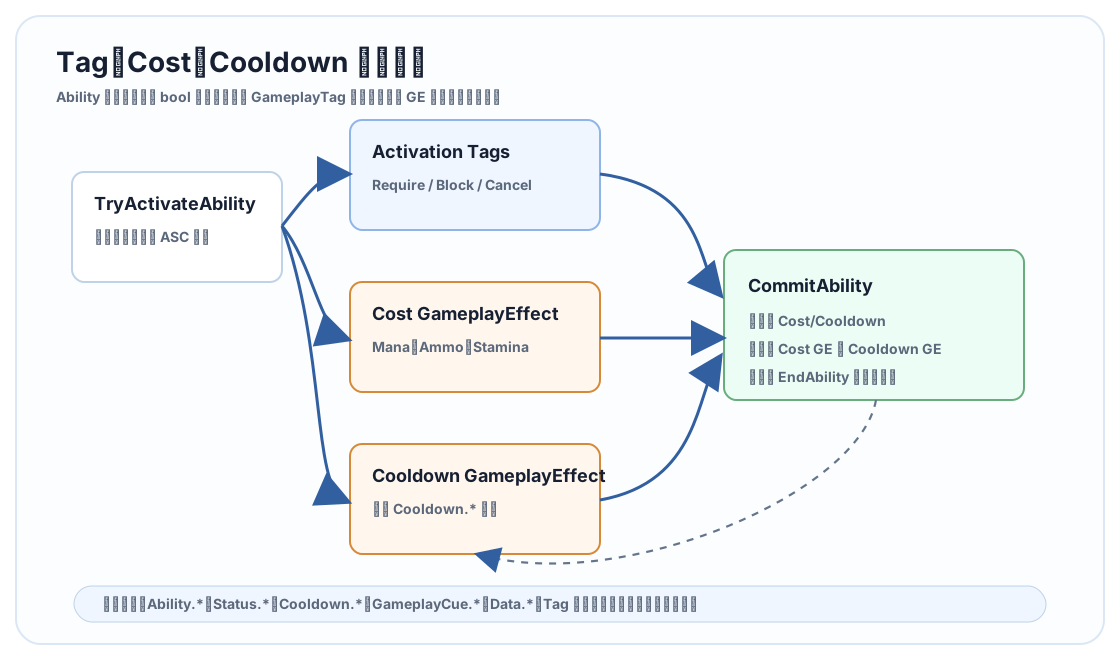
GameplayTag 是 GAS 的状态合同。Cost 和 Cooldown 则应该通过 GameplayEffect 统一提交。本文讲如何用 Tag 管理激活条件、阻塞、取消、状态、冷却和 UI 查询。
源码依据
关键文件:
GameplayAbility.hGameplayEffect.hGameplayEffectComponent.hAbilitySystemComponent.h
UGameplayAbility 提供 Tag 需求判断路径,DoesAbilitySatisfyTagRequirements 会检查 Source/Target Tag、Ability Tag、Cancel/Block 关系。GE Component 里也有 BlockAbilityTags、CancelAbilityTags、TargetTags、TargetTagRequirements 等组件化行为。
源码层面的核心思想是:状态不应该只藏在某个类的 bool 里,而应该进入 ASC 的 Tag 聚合体系,让 Ability、GE、UI、Cue 和调试器都能看见。
Tag 命名空间
建议项目一开始就固定命名空间:
| 命名空间 | 示例 | 作用 |
|---|---|---|
Ability.* |
Ability.Mage.Fireball |
Ability 身份和分类 |
Input.* |
Input.Ability.Primary |
输入映射 |
Status.* |
Status.Stunned |
角色状态 |
Cooldown.* |
Cooldown.Fireball |
冷却状态 |
Cost.* |
Cost.Mana |
消耗分类 |
GameplayCue.* |
GameplayCue.Fire.Hit |
表现事件 |
Data.* |
Data.Damage |
SetByCaller 数据键 |
State.* |
State.Aiming |
短期动作状态 |
不要把 Tag 当成随手起的字符串。Tag 一旦进入 GE、Ability、UI 和存档,它就是系统合同。
激活条件怎么写
Ability 的激活条件通常分三类:
- 通用条件:死亡、眩晕、沉默、无输入权限。
- Ability 自己的条件:必须在地面、必须持有武器、必须有目标。
- Cost/Cooldown 条件:Mana 是否够,冷却是否结束。
通用条件尽量用 Tag。比如 Status.Dead、Status.Stunned、Status.Silenced 进入 Block Tags。Ability 自己的特殊条件才重写 CanActivateAbility。
bool UGA_MeleeCombo::CanActivateAbility(
    const FGameplayAbilitySpecHandle Handle,
    const FGameplayAbilityActorInfo* ActorInfo,
    const FGameplayTagContainer* SourceTags,
    const FGameplayTagContainer* TargetTags,
    FGameplayTagContainer* OptionalRelevantTags) const
{
    if (!Super::CanActivateAbility(Handle, ActorInfo, SourceTags, TargetTags, OptionalRelevantTags))
    {
        return false;
    }

    const ACharacter* Character = Cast<ACharacter>(ActorInfo ? ActorInfo->AvatarActor.Get() : nullptr);
    return Character && Character->GetCharacterMovement() && Character->GetCharacterMovement()->IsMovingOnGround();
}
不要在这里重复检查 Mana 和 Cooldown。那是 CommitAbility 的工作。
Cost GameplayEffect
Cost GE 通常是 Instant GE,修改 Mana、Stamina、Ammo 等属性。
项目建议:
- 每类资源一个 Cost GE,或每个 Ability 一个 Cost GE。
- 消耗数值可以写在 GE 的 ScalableFloat,也可以通过 SetByCaller 传入。
- Ability 里统一调用
CommitAbility,不要手写扣资源。
bool UGA_CastSpell::CommitSpell()
{
    if (!CommitAbility(CurrentSpecHandle, CurrentActorInfo, CurrentActivationInfo))
    {
        return false;
    }

    return true;
}
如果某个技能消耗取决于蓄力时间,可以重写 ApplyCost,构建 Cost Spec 后写 SetByCaller,再应用。
Cooldown GameplayEffect
Cooldown GE 通常是 Duration GE,给目标 ASC 授予 Cooldown.* 标签。Ability 激活前检查是否已有对应 Cooldown Tag,Commit 后应用 Cooldown GE。
void UGA_Fireball::ApplyCooldown(
    const FGameplayAbilitySpecHandle Handle,
    const FGameplayAbilityActorInfo* ActorInfo,
    const FGameplayAbilityActivationInfo ActivationInfo) const
{
    UGameplayEffect* CooldownGE = GetCooldownGameplayEffect();
    if (!CooldownGE)
    {
        return;
    }

    FGameplayEffectSpecHandle SpecHandle = MakeOutgoingGameplayEffectSpec(CooldownGE->GetClass(), GetAbilityLevel());
    if (SpecHandle.IsValid())
    {
        static const FGameplayTag CooldownDurationTag = FGameplayTag::RequestGameplayTag(TEXT("Data.CooldownDuration"));
        SpecHandle.Data->SetSetByCallerMagnitude(CooldownDurationTag, CooldownSeconds);
        ApplyGameplayEffectSpecToOwner(Handle, ActorInfo, ActivationInfo, SpecHandle);
    }
}
如果 Cooldown GE 的 Duration 使用 SetByCaller,就可以让同一个冷却 GE 支持不同技能或不同等级。
UI 如何查询冷却和资源
UI 不应该复刻 Ability 激活逻辑。推荐 UI 查询 ASC:
- 是否有
Cooldown.FireballTag。 - 对应 Active GE 剩余时间。
- Mana 当前值和 Cost 数值。
- Ability 的
CanActivateAbility或项目封装的查询接口。
按钮状态建议拆成原因:
| 状态 | UI 展示 |
|---|---|
| 可释放 | 正常高亮 |
| 冷却中 | 显示倒计时 |
| 资源不足 | 显示资源缺口 |
| 被状态阻塞 | 显示眩晕/沉默原因 |
| 无目标 | 显示目标提示 |
不要只给 UI 一个 bool。玩家需要知道为什么不能放技能,调试也需要知道阻塞来源。
Cancel 和 Block
两个行为要分清:
- Block:阻止某些 Ability 新激活。
- Cancel:取消已经激活的 Ability。
比如眩晕 GE 可以:
- 授予
Status.Stunned。 - Block
Ability.Movement和Ability.Attack。 - Cancel 当前正在引导的
Ability.Channeling。 - 触发
GameplayCue.Status.Stunned。
UE5.8 的 GE Component 路线让这些行为更清晰,不需要把逻辑写成 Ability 之间互相找来找去。
项目落地规范
建议每个 Ability 配一张策略表:
| 项 | 示例 |
|---|---|
| Ability Tag | Ability.Mage.Fireball |
| Input Tag | Input.Ability.Primary |
| Cooldown Tag | Cooldown.Mage.Fireball |
| Cost Attribute | Mana |
| Required Tags | State.HasWeapon.Staff |
| Blocked By | Status.Dead、Status.Silenced、Cooldown.Mage.Fireball |
| Cancels | 可选,如取消低优先级引导 |
| Grants During Active | State.Casting |
设计评审时看这张表,比看 Ability 蓝图节点更容易发现冲突。
常见坑
- Tag 命名没有层级。 后期筛选和批量规则会很痛。
- Cooldown 用 float 变量。 UI、复制、预测和调试都看不到统一状态。
- Cost 手动扣属性。 资源不足、预测失败和服务器拒绝无法统一。
- CanActivate 里堆所有条件。 通用状态应该用 Tag,特殊条件才写代码。
- Block 和 Cancel 混用。 一个阻止新激活,一个终止已激活,语义不同。
- UI 自己算冷却。 应从 ASC Active GE 或 Tag 查询真实状态。
本篇结论:Tag 是 GAS 的状态语言,Cost/Cooldown GE 是资源和时间约束的标准通道。把这些规则资产化、标签化,Ability 才能保持简洁。
源码路径索引
Engine/Plugins/Runtime/GameplayAbilities/Source/GameplayAbilities/Public/AbilitySystemComponent.hEngine/Plugins/Runtime/GameplayAbilities/Source/GameplayAbilities/Private/AbilitySystemComponent.cppEngine/Plugins/Runtime/GameplayAbilities/Source/GameplayAbilities/Private/AbilitySystemComponent_Abilities.cppEngine/Plugins/Runtime/GameplayAbilities/Source/GameplayAbilities/Public/Abilities/GameplayAbility.hEngine/Plugins/Runtime/GameplayAbilities/Source/GameplayAbilities/Public/GameplayEffect.hEngine/Plugins/Runtime/GameplayAbilities/Source/GameplayAbilities/Public/AttributeSet.hEngine/Plugins/Runtime/GameplayAbilities/Source/GameplayAbilities/Public/GameplayPrediction.h