总览
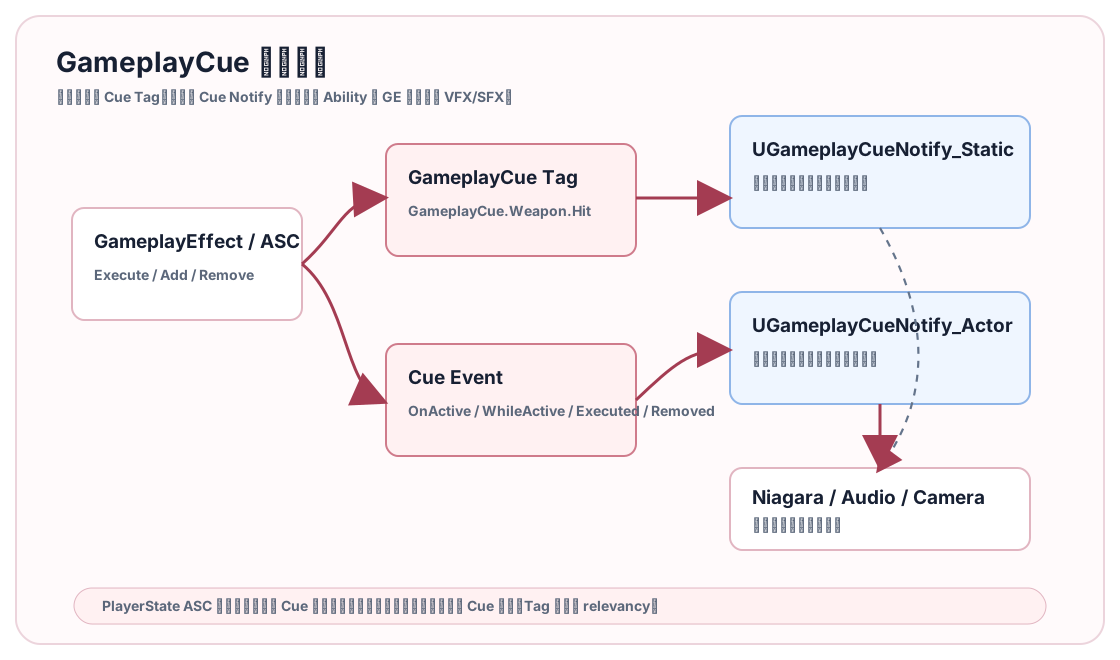
GameplayCue 的价值是把玩法逻辑和表现解耦。Ability 不应该知道火球命中播哪个 Niagara,GameplayEffect 不应该硬编码音效路径。逻辑只触发一个 GameplayCue.* Tag,表现层根据 Tag 决定如何播特效、音效、镜头和材质反馈。
本篇讲 Cue 的事件语义、Notify 类型、参数、复制路径和项目落地规范。
源码依据
关键点来自 GAS README、GameplayEffectTypes.h 和 GameplayCue 相关源码。
Cue 参数类型是 FGameplayCueParameters,包含:
- Magnitude。
- EffectContext。
- MatchedTag 和 OriginalTag。
- SourceTags 和 TargetTags。
- Location 和 Normal。
- Instigator 和 EffectCauser。
- SourceObject。
- PhysicalMaterial。
- EffectLevel 和 AbilityLevel。
- AttachComponent。
Cue 事件枚举包括:
OnActiveWhileActiveExecutedRemoved
README 里还说明 Burst 类 Cue 通过不可靠 RPC 复制,Looping 类 Cue 依赖复制变量维持状态。PlayerState 持有 ASC 时,要特别关注网络相关性和复制代理。
Cue Tag 命名
推荐把 Cue Tag 当表现 API:
| Tag | 语义 |
|---|---|
GameplayCue.Weapon.Rifle.Fire |
步枪开火 |
GameplayCue.Weapon.Rifle.Hit.Flesh |
步枪命中角色 |
GameplayCue.Spell.Fireball.Explode |
火球爆炸 |
GameplayCue.Status.Burning.Loop |
燃烧持续表现 |
GameplayCue.Shield.Break |
护盾破裂 |
不要把具体资产名放进 Tag。Tag 表达语义,Notify 决定资产。
Static 还是 Actor
| 类型 | 生命周期 | 适合 |
|---|---|---|
UGameplayCueNotify_Static |
无状态、一次执行 | 命中特效、爆炸、治疗闪光 |
UGameplayCueNotify_Actor |
可持续、可附着、可结束 | 燃烧循环、护盾、光环、持续冰冻 |
Burst 表现优先 Static。持续表现用 Actor,因为它需要 OnActive 创建、WhileActive 保持、Removed 清理。
UCLASS()
class UGCN_HitSpark : public UGameplayCueNotify_Static
{
    GENERATED_BODY()

public:
    virtual bool OnExecute_Implementation(AActor* MyTarget, const FGameplayCueParameters& Parameters) const override
    {
        if (!MyTarget || !HitSystem)
        {
            return false;
        }

        const FVector SpawnLocation = Parameters.Location.IsNearlyZero()
            ? MyTarget->GetActorLocation()
            : Parameters.Location;

        UNiagaraFunctionLibrary::SpawnSystemAtLocation(
            MyTarget,
            HitSystem,
            SpawnLocation,
            Parameters.Normal.Rotation());

        return true;
    }

private:
    UPROPERTY(EditDefaultsOnly)
    TObjectPtr<UNiagaraSystem> HitSystem;
};
这段代码只做表现,不做伤害,不改属性,不决定命中是否有效。
Cue 从哪里触发
常见触发路径:
- GE 自带 GameplayCue。
- Ability 显式调用 ASC 的 Cue 接口。
- GameplayCue Notify 由 Active GE 的 Add/Remove 自动触发。
推荐优先让 GE 触发 Cue。比如伤害 GE 触发命中 Cue,燃烧 GE 触发燃烧循环 Cue。这样表现跟状态绑定,调试 Active GE 时也能看到 Cue 来源。
Ability 显式触发适合纯表现或不需要状态的瞬时反馈,比如本地开镜、蓄力提示。但要避免客户端随便触发会影响其他人的权威表现。
Cue 参数设计
Cue 参数应该带足表现需要的信息:
| 信息 | 来源 |
|---|---|
| 命中位置 | TargetData HitResult 或 EffectContext |
| 法线 | HitResult Normal |
| 伤害大小 | Cue Magnitude 或 SetByCaller 映射 |
| 攻击者 | Instigator |
| 武器 | SourceObject 或 EffectCauser |
| 物理材质 | HitResult PhysMaterial |
| 元素类型 | GameplayTag |
不要让 Cue Notify 再去世界里查一遍“我到底命中了哪”。命中数据应该在 TargetData/EffectContext 里传下来。
复制与相关性
Cue 的网络问题常见于两类场景:
- ASC 放在 PlayerState,远端客户端看不到 Cue。
- Cue 由本地预测触发,服务器结果回来后重复或消失。
排查顺序:
- Cue Tag 是否在 GameplayCue 路径里。
- Cue Notify 资产是否被扫描到。
- GE 是否真的应用到了目标 ASC。
- Cue 是 Executed 还是 Active/Removed。
- 目标 Actor 对远端是否 relevant。
- PlayerState ASC 是否需要复制代理。
- 本地预测和服务器确认是否重复触发。
PlayerState ASC 很适合保存玩家长期状态,但表现通常附着在 Character 上。项目里要保证 Cue 参数里有正确的 Avatar 或 AttachComponent。
项目落地规范
建议建立 Cue 内容规则:
| 项 | 建议 |
|---|---|
| 路径 | /Game/GameplayCues/... |
| 命名 | GCN_Weapon_Rifle_Hit_Flesh |
| Tag | 与资产语义一致,不带具体 Niagara 名 |
| 数据 | Location、Normal、Instigator、SourceObject 尽量齐全 |
| 权威 | 影响其他玩家的 Cue 由服务器状态触发 |
| 预测 | 本地预测 Cue 要能和服务器确认对账 |
GASToolsets 里的 GameplayCue 工具可以列出 Cue、查 Notify、创建 Cue Notify、找没有 Notify 的 Cue Tag。它很适合做内容检查,但创建或删除 Cue Tag 要走人工确认。
常见坑
- Ability 里硬编码特效。 后期替换表现要改逻辑。
- Cue Tag 没进扫描路径。 GE 触发了,Notify 找不到。
- Static Cue 做持续表现。 没有生命周期,很难清理。
- Cue 里做伤害。 Cue 是表现层,不应该改变玩法结果。
- PlayerState ASC 远端不显示 Cue。 查网络相关性和复制代理。
- 预测 Cue 重复。 本地预测和服务器确认要有去重或可接受的表现策略。
本篇结论:GameplayCue 是 GAS 的表现接口。逻辑发语义,表现资产响应语义。这个边界守住后,技能美术、音频、镜头和玩法代码才不会互相绑死。
源码路径索引
Engine/Plugins/Runtime/GameplayAbilities/Source/GameplayAbilities/Public/AbilitySystemComponent.hEngine/Plugins/Runtime/GameplayAbilities/Source/GameplayAbilities/Private/AbilitySystemComponent.cppEngine/Plugins/Runtime/GameplayAbilities/Source/GameplayAbilities/Private/AbilitySystemComponent_Abilities.cppEngine/Plugins/Runtime/GameplayAbilities/Source/GameplayAbilities/Public/Abilities/GameplayAbility.hEngine/Plugins/Runtime/GameplayAbilities/Source/GameplayAbilities/Public/GameplayEffect.hEngine/Plugins/Runtime/GameplayAbilities/Source/GameplayAbilities/Public/AttributeSet.hEngine/Plugins/Runtime/GameplayAbilities/Source/GameplayAbilities/Public/GameplayPrediction.h